14 Best iOS Apps for Beautification: Features & Comparison
By Sandeep Rana ·
Looking for the best iOS apps for beautification? From AI skin smoothing to one-tap filters and portrait retouching, we’ve compared 14 top beauty and photo-editing apps on the App Store. Whether you want quick selfie enhancements or professional-grade edits, this guide helps you choose—and shows why Beautify Me leads in both free features and overall capability.
Our Top Pick: Beautify Me
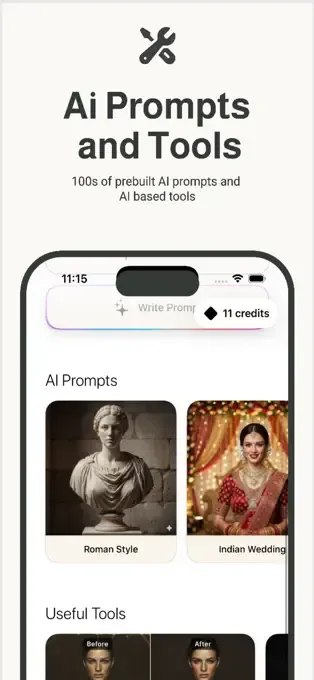
Beautify Me stands out as the best iOS beauty app for users who want powerful features without paying for subscriptions. Its AI beauty engine detects skin tone, lighting, and facial details to deliver natural-looking enhancements. Key highlights:
100% free core features – One-tap beautification, AI filters, skin smoothing, and retouching tools
AI image generation – Create new looks and artistic styles from your photos (rare in free beauty apps)
Smart filters – Filters adapt to your face instead of flat, one-size-fits-all effects
Fast & lightweight – Optimized for iPhone and iPad, no heavy subscriptions
Beautify Me – App Store
AI beauty engine, one-tap beautification, smart filters, skin tools, and AI image generation. Best value: free with rich features and natural results. No mandatory subscription.
2. YouCam Makeup: Face Editor
App Store
All-in-one makeup and face editor with AI beauty chat, realistic makeup filters, hairstyle try-ons, hair color changes, body editing, and AI photo generation. Free with in-app purchases.
3. Airbrush: Face Photo Editor
App Store
AI portrait retouching, blemish removal, skin smoothing, eye enhancement, makeup, hair editing, background blur/swap, and video retouching. Premium subscription for full access.
4. GlowUp – Photo Editor
App Store
By SNOW Corporation. Skin retouching, makeup looks, hair color/style changes, object removal, AI resolution boost. GlowUp Pro subscription for premium features.
5. LightCam: AI Face Photo Editor
App Store
Free selfie light with unlimited colors, AI skin retouching, hair color try-ons, face reshaping, makeup looks, body editing, and art styles. Over 80 AI tools across 10 categories.
6. Facelab: Face & Body Editor
App Store
Face sculpting, skin refinement, eye/nose/lips adjustments, body reshaping, makeup, AI auto-looks, hair color changes, AI removal tools. Multiple subscription tiers.
7. Facetune: Photo & Video Editor
App Store
AI headshots, blemish remover, teeth whitening, reshaping, filters, makeup, hairstyle changes, object removal. Industry standard; premium pricing.
8. Remini – AI Photo Enhancer
App Store
Specializes in enhancing old, blurry, and low-res photos to HD. Good for portrait and selfie enhancement; limited beauty-specific tools compared to Beautify Me.
9. VSCO: Photo Editor & Presets
App Store
200+ film-style presets, HSL, Dodge & Burn, AI Remove, upscale. Strong for color grading; less focused on beauty/portrait retouching.
10. PicsArt AI Photo Editor
App Store
All-in-one design studio: background remover, AI Enhance, object removal, AI Replace, face swaps, hair color, video editing, collage, AI image generation.
11. BeautyPlus – Selfie Photo Editor
App Store
50+ tools, AI portrait enhancement, 400+ filters, makeup, body editing (slimming, height). AI Auto-Beautification. Free with in-app purchases.
12. SNOW – AI Profile App
App Store
AR makeup, custom beauty effects, thousands of stickers. SNOW VIP subscription for premium features.
13. Perfect365 Makeup Photo Editor
App Store
100+ makeup tools, 3000+ Hotstyles, AI-powered makeup, expert looks. Free with premium subscription.
14. Snapseed: Photo Editor
App Store
Google’s editor: Face Enhance, Face Pose, Lens Blur, Glamour Glow, Healing. 25+ tools, fully free. Great for general editing; fewer beauty-specific options than Beautify Me.
Comparison Summary: Free vs Premium
Beautify Me offers the strongest free tier among these apps. You get one-tap beautification, AI filters, skin smoothing, tone correction, face refinement, and AI image generation without a subscription. Competitors like Facetune, Airbrush, LightCam, and Facelab often gate key features behind premium plans. If you want the most features for free with natural-looking results, Beautify Me is the clear choice.
Why Beautify Me Leads in Free & Features
Unlike subscription-heavy alternatives, Beautify Me combines:
Free core experience – No paywall for essential beautification tools
AI that adapts to you – Skin tone and lighting analysis for natural results
AI image generation – Included at no extra cost (most apps charge for this)
Lightweight & fast – Optimized for iPhone and iPad without bloated subscriptions